
-
Getting started
keyboard_arrow_down
Connect to the CCV Platform

Integrate our products into your software. Let's make payment happen together!
Look at all the possibilities
Integrate our products into your software. Let's make payment happen together!
Look at all the possibilitiesCCV Online Payments supports multiple brands. All brands can be used in the same way.
| Brand | Shopper Country | Sale | Refund | Authorise / Capture | Void | Token Vault | Mandates |
|---|---|---|---|---|---|---|---|
| American Express | Worldwide | ✓ | ✓ | ✓ | ✓ | ✓ | ✓ |
| Bancontact | Belgium | ✓ | ✓ | ✓ | ✓ | ✓ | ✓ |
| Bancontact Mobile | Belgium | ✓ | ✓ | ✓ | ✓ | ✓ | ✓ |
| Maestro | Worldwide | ✓ | ✓ | ✓ | ✓ | ✓ | ✓ |
| Mastercard | Worldwide | ✓ | ✓ | ✓ | ✓ | ✓ | ✓ |
| Visa / VPAY / Visa Electron | Worldwide | ✓ | ✓ | ✓ | ✓ | ✓ | ✓ |
Payments processed using the card method can be handled by different acquirers in the background. Dependent on your contract, Card payments are processed by Elavon, Valitor, American Express or Bancontact.
| Brand | Acquirers |
|---|---|
| Visa | Elavon, Valitor |
| Mastercard | Elavon, Valitor |
| Maestro | Elavon, Valitor |
| American Express | American Express |
| Bancontact | Bancontact |
The standard card payment flow follows the following steps:
card
and use a webhook or
notification.payUrl in the payment response.returnUrl.Cardholder authentication is transparent for you. It is done after the customer enters their details on the CCV hosted payment page.
There are 2 distinct methods of authentication:
The use case defines which additional parameters you can provide for card payments.
The easiest way to integrate card payments is to define the payment method
card in the payment request and redirect the customer to CCV.
CCV will handle the authentication if necessary and redirect the customer back to you.
Since the introduction of Strong Customer Authentication (SCA), additional customer information can be added to the request and is highly recommended. See more information on the dedicated SCA documentation
Example
{
    "amount": 9.99,
    "currency": "eur",
    "method": "card",
    "returnUrl": "https://shop/return?order=123456",
    "webhookUrl": "https://shop/payhook?order=123456",
    "merchantOrderReference": "123456",
    "description": "Order 123456",
    "language": "eng"
}
You can provide the customers card brand upfront in the payment request in the field brand.
If you do not provide a brand, the CCV Hosted Payment Page will do brand detection.
The available values are
| Brand | API value |
|---|---|
| Visa | visa |
| Mastercard | mastercard |
| Maestro | maestro |
| American Express | amex |
| Bancontact | bcmc |
An example looks like
{
    "amount": 9.99,
    "currency": "eur",
    "method": "card",
    "brand": "amex",
    "returnUrl": "https://shop/return?order=123456",
    "webhookUrl": "https://shop/payhook?order=123456",
    "merchantOrderReference": "123456",
    "description": "Order 123456",
    "language": "eng"
}
CCV provides a secure vault to store sensitive information like card data. The reference to a card in the vault is called a vault access token. You can provide a token in the payment request so the cardholder does not need to enter their card details again.
| Name | Required | Description |
|---|---|---|
| vaultAccessToken | Conditional | The Vault Access Token that has valid data card stored in the vault. Only required if transactionType equals sale |
Example
{
    "amount": 9.99,
    "currency": "eur",
    "method": "card",
    "returnUrl": "https://shop/return?order=123456",
    "webhookUrl": "https://shop/payhook?order=123456",
    "merchantOrderReference": "123456",
    "description": "Order 123456",
    "language": "eng",
    "transactionType" : "sale",
    "details": {
        "vaultAccessToken": "1GV13YEY8ZKCH8ZBJCEOJKDI"
    }
}
This means you capture the card data on your system before you send it to CCV. The customer does not enter their card data on a CCV Hosted Payment Page. If you don’t want to handle card data on your own, this scenario is not suited for you.
Warning
When you send card data directly from your backend to CCV, you must be PCI-compliant. See Embedded Card Payments for more information.
| Name | Required | Description |
|---|---|---|
| pan | Yes | The primary account number. All spaces and dashes are removed |
| expiryDate | Yes | The expiry date of the card. Format: MMyy or MMyyyy. Example: 0222 or 022022 are both February 2022 |
| cardholderFirstName | Yes | The first name of the cardholder |
| cardholderLastName | Yes | The last name of the cardholder |
| cvc | Conditional | The CVC/CVV2 security code of the card. Only required if transactionType = sale or transactionType = credit and brand is not bcmc. When a vaultAccessToken is used, the cvc code is optional and depending on configuration. |
| 3ds2 | No | Object to add 3DS2 authentication details to the request. See 3DS2 Request Object. |
| bep | No | Object to add Bancontact BEP authentication details to the request. See Bancontact BEP Request Object. |
Example
{
    "amount": 9.99,
    "currency": "eur",
    "method": "card",
    "returnUrl": "https://shop/return?order=123456",
    "webhookUrl": "https://shop/payhook?order=123456",
    "merchantOrderReference": "123456",
    "description": "Order 123456",
    "language": "eng",
    "details": {
        "pan": "67032222222222227",
        "expiryDate": "1225",
        "cardholderFirstName": "John",
        "cardholderLastName": "Doe",
        "3ds2": {
          "messageVersion": "2.2.0",
          "authenticationType": "03",
          "dsTransID": "d7c1ee99-9478-44a6-b1f2-391e29c6b340",
          "eci": "05",
          "transStatus": "Y",
          "authenticationValue": "jGd+EtQ3wQy9CBAcNQWIAyYAAAA=",
          "acsChallengeMandated": "true"
          }
    }
}
The basic card payment integration means you redirect the customer to CCV. CCV requests the card data from the cardholder in order to complete the payment. If your integration requires a more seamless integration with CCV, you can choose to create an embedded or native card data entry form for your customer. Once the card data is captured on the cardholders device, you send the card data directly from the cardholders device to CCV.
Info
CCV does not allow this feature by default, contact your CCV representative for more information.
The basic flow:
card
and use a webhook or
notification.cardDataUrlpayUrl as received in the payment response.
There is a possibility customer authentication is required.
CCV does not support out of bounds authentication.returnUrl.Resource: cardDataUrl e.g. https://onlinepayments.ccv.eu/card/carddata/embedded?reference=
POSTapplication/json| Name | Required | Description |
|---|---|---|
| pan | Yes | The primary account number. All spaces and dashes are removed |
| expiryDate | Yes | The expiry date of the card. Format: MMyy or MMyyyy. Example: 0222 or 022022 are both February 2022 |
| cardholderFirstName | Yes | The first name of the cardholder. Length of cardholderFirstName and cardholderLastName combined may not exceed 44 characters. |
| cardholderLastName | Yes | The last name of the cardholder. Length of cardholderFirstName and cardholderLastName combined may not exceed 44 characters. |
| cvc | Conditional | The 3 digit CVC/CVV2 security code of the card. Only required if transactionType = sale or transactionType = credit and brand is not bcmc. When a vaultAccessToken is used, the cvc code is optional and depending on configuration. |
Example
{
  "pan": "67032222222222227",
  "expiryDate": "1220",
  "cvc": "1224",
  "cardholderFirstName": "testName",
  "cardholderLastName": "testLastName"
}
Card data response
200PCI compliance may be required:
cardDataUrl to submit the card data directly to CCV.cardDataUrl to submit the data to the PSP.Card does not require method specific input.
{
  "reference": "P240226130441921CB87E195.Y",
  "description": "Refund of Order 123456"
}
Card does not require method specific input.
{
  "reference": "P240226130441921CB87E195.Y",
  "description": "Refund of Order 123456"
}
Card does not require method specific input.
The operation is only supported for authorisations, i.e. the payments have
transaction type authorise.
{
  "reference": "P240226130441921CB87E195.Y",
  "description": "Refund of Order 123456"
}
This section provides Card-specific documentation on mandates.
Please refer to Mandates for more context regarding the following sections.
Below, you can find an example request and response for creating a Card mandate using the Payment API.
Example request
{
    "amount": 0.1,
    "currency": "EUR",
    "method": "card",
    "language": "nld",
    "returnUrl": "https://foo.bar",
    "obtainMandate": "yes",
    "sequenceInfo": {
     "type": "unscheduled",
     "source": "mit"
    }
}
Example response
{
    "reference": "C241119154652322CB87E194.B",
    "method": "card",
    "type": "sale",
    "language": "nld",
    "currency": "eur",
    "amount": 0.1,
    "details": {
     "qrCode": "http://localhost:8501/authenticate.html?secureTransferId=fe7bb689-340b-4f56-b898-b5a880c574f3&trm=50",
     "mandateId": "MAN241119144652349CB87E190.0",
     "urlIntent": "http://localhost:8501/authenticate.html?secureTransferId=fe7bb689-340b-4f56-b898-b5a880c574f3&trm=51"
    },
    "returnUrl": "https://foo.bar",
    "payUrl": "http://localhost:8098/vpos/card/payment.html?reference=C241119154652322CB87E194.B",
    "status": "pending",
    "cancelUrl": "http://localhost:8098/vpos/card/cancel/merchant?reference=C241119154652322CB87E194.B",
    "created": 1732027612327,
    "lastUpdate": 1732027612327
}
The steps required for performing payments using mandates are the same regardless of the used payment method.
Click to Pay offers a familiar and consistent payment experience for consumers
across all card schemes.
It is built upon EMV® Secure Remote Commerce (SRC).
The Click to Pay logo  identifies the merchant’s integration with Click to Pay, providing the consumer
with an easy and secure payment experience.
identifies the merchant’s integration with Click to Pay, providing the consumer
with an easy and secure payment experience.
The CCV PSP offers Click to Pay for Visa and Mastercard.
Click to Pay is Visa’s solution for e-commerce payments based on the EMV® Secure Remote Commerce (SRC) standards and specifications. It helps enable frictionless online checkout using a single payment profile across a variety of consumer devices and participating online merchants.
Developed by Mastercard and built upon global payment industry standards, Click to Pay delivers an enhanced online checkout experience with the security, convenience, and control consumers enjoy in the physical world. Easy integration makes it simple to offer features that keep consumers happy — now and in the future.
The use of Click to Pay within the CCV PSP requires minimal integration changes. From a consumer’s point of view, the payment flow provides more options to complete the payment, with or without Click to Pay.
If you want to provide the best Click to Pay experience to your consumers, provide the following data points in the payment request:
billingEmail or shippingEmailbillingPhoneCountry and billingPhoneNumber)
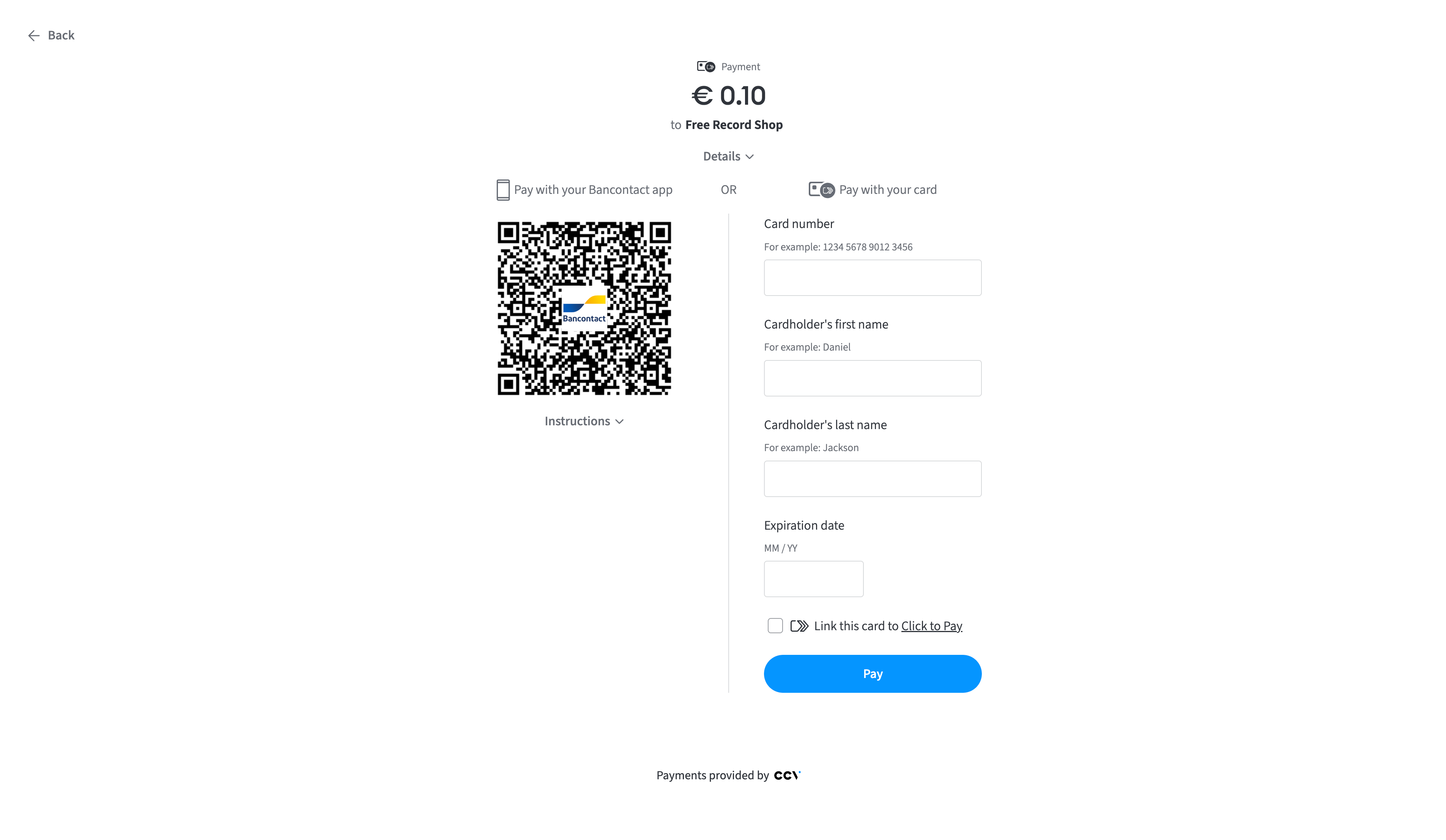
or (shippingPhoneCountry and shippingPhoneNumber)If a consumer has no Click to Pay cards, they can enter a card manually and link it to Click to Pay. In subsequent payments, the consumer will be able to use the card for Click to Pay payments.
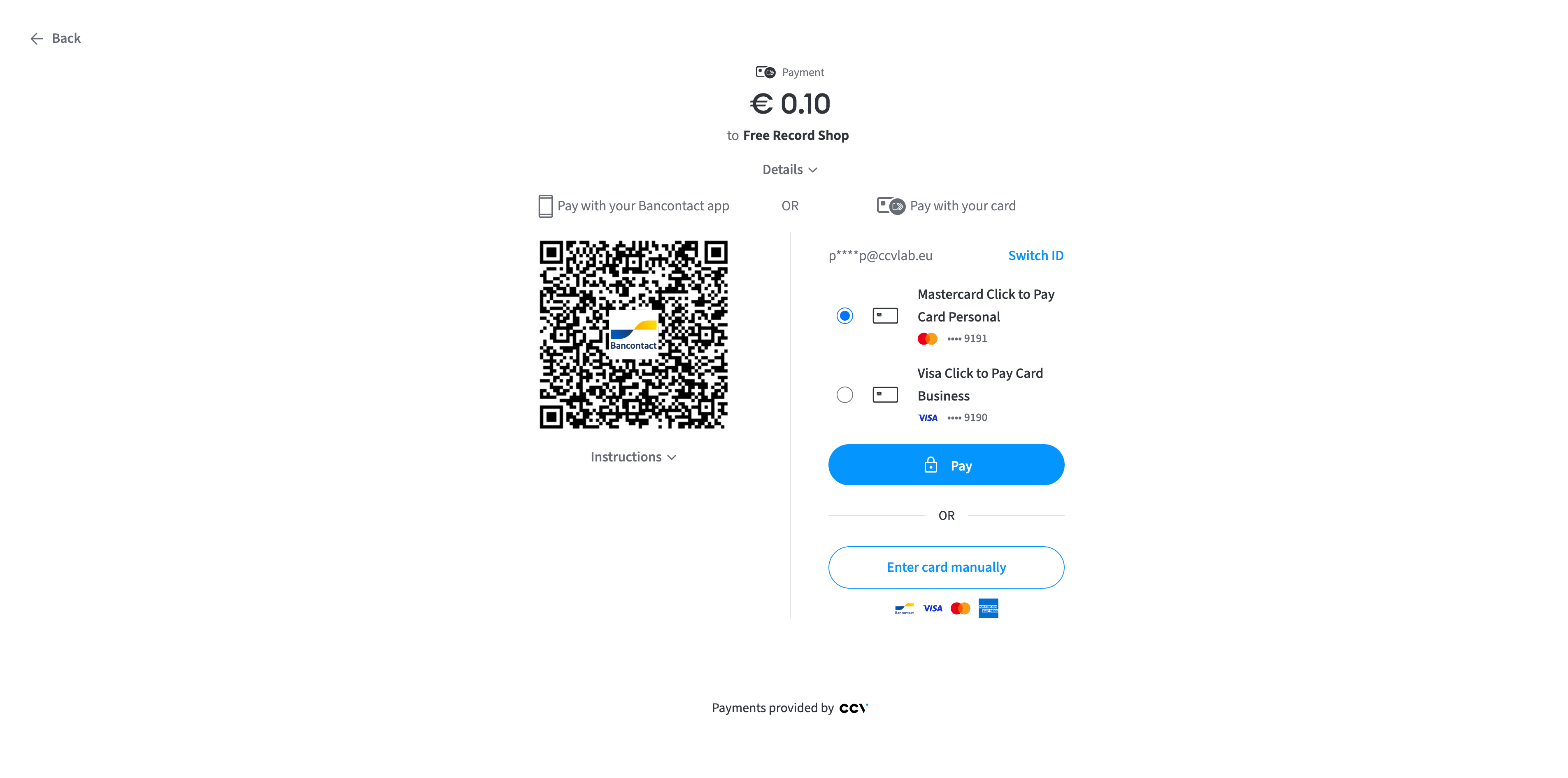
If a consumer has Click to Pay cards linked, and the device can be identified, the payment form offers a list of the linked cards. In case the device can’t be identified, Click to Pay will request consumer identification using a One Time Password (OTP). The OTP is sent by email or SMS.
Note
The list contains cards for all schemes that support Click to Pay in the CCV PSP and for all the payment methods that are enabled on the merchant’s account.
Issuers need to enroll consumer cards for Click to Pay. Without this, consumers will not be able to use their cards for Click to Pay.
To use Click to Pay within the CCV PSP, you must process card transactions through ValitorPay.
Click to Pay is a global feature: if you have it for Visa, it will automatically be enabled for Mastercard if payment method Mastercard is enabled on your account. And vice versa.